Last time in Python class
- Interpreter in the terminal
- Interpreter in IDLE
- Interpreter via files
- Types
- string
- int
- float
Functions
A function is a piece of code that's already written
It can be called whenever you want
Functions look like this:
function_name(list_of_parameters_separated_by_comma)
Example: len("I like my dog")
pow(2,8)
print is a function, but it's an exception
in Python 3, it's no longer an exception, they fixed it
for now we use: print "I like my dog"
import
Many functions are defined in libraries
You have to import the library before you can access the function
import math
math.sqrt(16)
The TURTLE
Yes, I said turtle
Try the following
- import the module called "turtle"
- create a turtle
- ask Python to tell us what exactly did we create
import turtle
t = turtle.Turtle()
print type(t)
What is the type of the variable t?
<class 'turtle.Turtle'>
A class is an object.
strings, integers and floats are all objects.
We just created a turtle object
Just like strings have some internal behaviour that we can use, turtles have fun behaviours
Remember
"the lord of the rings".title()
All calls to objects will follow this pattern:
object dot functionName parenthesis
Let's get our turtle moving!
import turtle
beach = turtle.Screen()
t = turtle.Turtle()
t.forward(150)
turtle.done()
Let's go over the code and see what each one does
- import turtle
- beach = turtle.Screen()
- t = turtle.Turtle()
- t.forward(150)
- turtle.done()
Some fun
Try: (add it before the forward call)
t.shape("turtle")
Other shapes are “arrow”, “circle”, “square”, “triangle”, “classic”
Some fun part 2
Try:
t.ht()
It's the same as t.hideturtle()
Now it makes sense! ht -> hideturtle
And get your turtle back with t.showturtle() or t.st()
More fun
Try: (before the call to forward() fd() )
t.pencolor("red")
Try different colours
Hexa colors like #F0F0F0
RGB codes, like (255,0,255)
Gimme a red square
you might want to use the following:
- .forward(distance)
- .left(degrees)
import turtle
beach = turtle.Screen()
beach.title("RED SQUARE")
t = turtle.Turtle()
t.pencolor("red")
t.forward(200)
t.right(90)
t.forward(200)
t.right(90)
t.forward(200)
t.right(90)
t.forward(200)
t.right(90)
beach.exitonclick()
Let's put the square in the center
Think about the width and height of the square
t.goto(-100,100)Let's remove that extra line
t.penup() t.pendown()DRY : DON'T REPEAT YOURSELF
all those forwards and turn right are annoying
Replace them all with the following:for i in range(4):
t.forward(200)
t.right(90)
Woah! Lots of things here!
for i in range(4):
a range is an enumeration.
it's the difference between 4 and counting up to 4 (1,2,3,4)
So range(4) means 0,1,2,3
for i in range(4):
i is the name of a variable.
for i in range(4):
basically tells the computer to count up to 4
anything that is in the block following it is executed each time
a block starts after the colon
every line must be indented perfectly
BLOCKS
many bugs can be blamed on wrong indentation
be warned!
Here is the block again
for i in range(4):
    t.forward(200)
    t.right(90)
Blocks are the legos of Python
Always the same format:
- One line of logic reasoning, ended with a colon
- one or more lines of INDENTED python code (4 spaces)
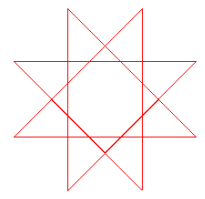
let's modify our for loop slightly
for i in range(8):
   t.forward(200)
   t.right(225)
Here's the result:
let's modify our for loop slightly more
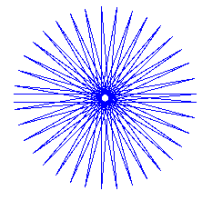
this will take a bit long, so we add a line before the loop
t.speed(0)
for i in range(37):
   t.forward(200)
   t.right(175)
Another result:
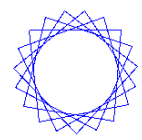
a last one
for i in range(20):
    t.forward(100)
    t.left(94.65)
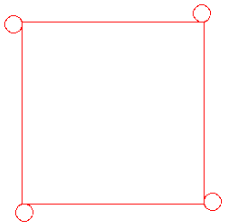
What do you get if we do this change?
for i in range(4):
    t.forward(200)
    for j in range(12):
        t.left(30)
        t.fd(5)
    t.right(90)
Here's what you're supposed to get
So a block can be part of another block, as we just saw
blocks are like...

Let's do a star
for x in range(1,19):
   t.forward(100)
   if x % 2 == 0:
      t.left(175)
   else:
      t.left(225)